{ "@context": "https://schema.org", "@type": "FAQPage", "mainEntity": [ { "@type": "Question", "name": "What is the ROI of AI video analytics?", "acceptedAnswer": { "@type": "Answer", "text": "The ROI of AI video analytics varies by deployment, but industry data shows 85% of organisations achieve payback within 12 months. Common ROI drivers include reduced security staffing costs (30–50%), faster incident resolution, theft and shrinkage reduction (typically 15–40% in retail), and avoidance of regulatory fines through documented compliance. Enterprise deployments across 50+ sites typically achieve full payback in 6–10 months." } }, { "@type": "Question", "name": "How long does AI video analytics take to pay back?", "acceptedAnswer": { "@type": "Answer", "text": "85% of organisations see payback from AI video analytics within 12 months. The most common payback window is 6–12 months for mid-to-large enterprise deployments. Faster payback (under 6 months) is typical in retail environments where AI analytics directly reduces shrinkage and staffing costs. ROI timelines are influenced by deployment size, number of cameras, and which use cases are prioritised." } }, { "@type": "Question", "name": "What is the ROI of AI video analytics in retail?", "acceptedAnswer": { "@type": "Answer", "text": "In retail, AI video analytics ROI is primarily driven by shrinkage reduction (15–40%), staffing optimisation, and footfall-to-conversion insight. Retailers deploying AI video analytics typically see full payback in 4–9 months. Queue management and self-checkout fraud detection are the highest-ROI retail use cases, with some deployments recovering costs within a single trading quarter." } }, { "@type": "Question", "name": "What is the ROI of AI video analytics at enterprise scale?", "acceptedAnswer": { "@type": "Answer", "text": "At enterprise scale (100+ sites, 1,000+ cameras), AI video analytics ROI is driven by centralised monitoring (replacing distributed security teams), automated incident triage, and integration with access control and operational systems. Enterprise deployments commonly achieve 40–60% reductions in security operational cost within 18 months, in addition to risk reduction benefits from faster incident detection and response." } }, { "@type": "Question", "name": "Which AI analytics platform offers the easiest deployment and fastest ROI?", "acceptedAnswer": { "@type": "Answer", "text": "Platforms that integrate natively with existing VMS infrastructure offer the fastest deployment and ROI. Wavestore WaveFusion integrates AI video analytics directly into the unified security platform, eliminating the integration overhead of deploying a standalone analytics vendor. This reduces deployment timelines from months to weeks and enables ROI from day one of go-live." } } ]
}
AI-powered video analytics — the use of machine learning to automatically detect objects, behaviours, and events in video feeds — delivers measurable ROI for enterprise organisations. According to industry research analysed by Wavestore, over 85% of organisations achieve full payback within 12 months of deployment, with manufacturing and banking achieving 90-95% payback rates. This guide breaks down the real costs, quantified savings by industry, and a proven 3-phase deployment roadmap that works with cameras you already own.
While AI-powered analytics consistently deliver significant bottom-line impact, returns and timelines vary widely based on sector maturity and deployment scale. The table below synthesizes typical ROI ranges, average payback periods, and operational impacts across major industries, compiled from recent market studies, verified case reports, and vendor benchmarks.
Industry
Average ROI
Median ROI
Payback Period
Revenue Impact
Cost Reduction
Productivity Gain
Adoption Level
Retail/E-Commerce
~30–100% (▶41%)*
~20–50%
6–12 months
+5–10% (e.g. gen-AI)
Inventory & labor cuts 10–30%
Staff time/frees up ~20–30%
High; ~88% organizations use AI (McKinsey)
Manufacturing
100–200% (up to 320% in cases)
~100%
12–18 months
+5–15% (yield, capacity)
-20–50% on waste, maintenance
+20–40% (OEE, throughput)
Moderate–High; many IoT/AI projects
Healthcare/Pharma
50–150%
~80%**
12–24 months
Indirect (quality, new care revenue)
-5–20% (cost per case, supplies)
+10–30% (operations)
Growing; 100% CIOs plan AI by 2026
Banking (Retail)
~100% (SAS case 111%)
~50–100%
~24 months
+5–8% (cross-sell)
-15–30% (operational cost)
+20–30% (marketing, analytics)
High in large banks
Oil & Gas
200–400% (340% avg)
~300%
8–14 months
Indirect (output up)
-38% (maintenance)
+50–70% (equipment reliability)
Moderate–High (capital projects)
Logistics/Supply Chain
100–300%
~150%
12–18 months
+3–8% (service level)
-10–30% (transport, inventory)
+20–50% (on-time delivery)
Moderate; accelerating (S&OP)
Construction
50–150%
~80%
18–36 months
+3–5% (project throughput)
-5–20% (rework, overruns)
+10–20% (planning)
Emerging; pilots only
Travel/Hospitality
50–200%
~100%
6–12 months
+2–5% (occupancy)
-5–20% (staff efficiency)
+20–40% (service time)
Moderate; key chains adopt
Education
20–80%
~50%
12–24 months
+1–3% (enrollment/yield)
-5–15% (admin cost)
+10–20% (processes)
Low–Moderate (edtech)
Public Sector
30–100%
~50–80%
12–18 months
+0–5% (service quality)
-10–40% (case processing)
+30–70% (productivity)
Moderate–High (national initiatives)
*Note: Entries in this table combine both measured ROI (from documented case studies) and expected industry benchmarks. Payback periods and actual returns depend heavily on data quality, local network architecture (edge vs. cloud), and how effectively alerts are integrated into active security workflows.
To understand how these numbers translate to real-world operations, let's look at the specific use cases and deployment trends driving these returns in key sectors.
Your business is storing terabytes of video data. You're paying for the storage. You're paying for the cameras. You're paying for the network bandwidth. And right now, that infrastructure is doing one thing: recording. Not analyzing. Not alerting. Not preventing.
Your CCTV system is a cost center that happens to provide forensic evidence when something goes wrong. But the cameras are already there. The network is already there. The question isn't whether to invest in video infrastructure—you already did. The question is whether that infrastructure should do more than just record.
AI-powered video analytics turns existing cameras into operational intelligence. Not someday. Not with a complete system replacement. With the cameras you have now.
Here's what changes:
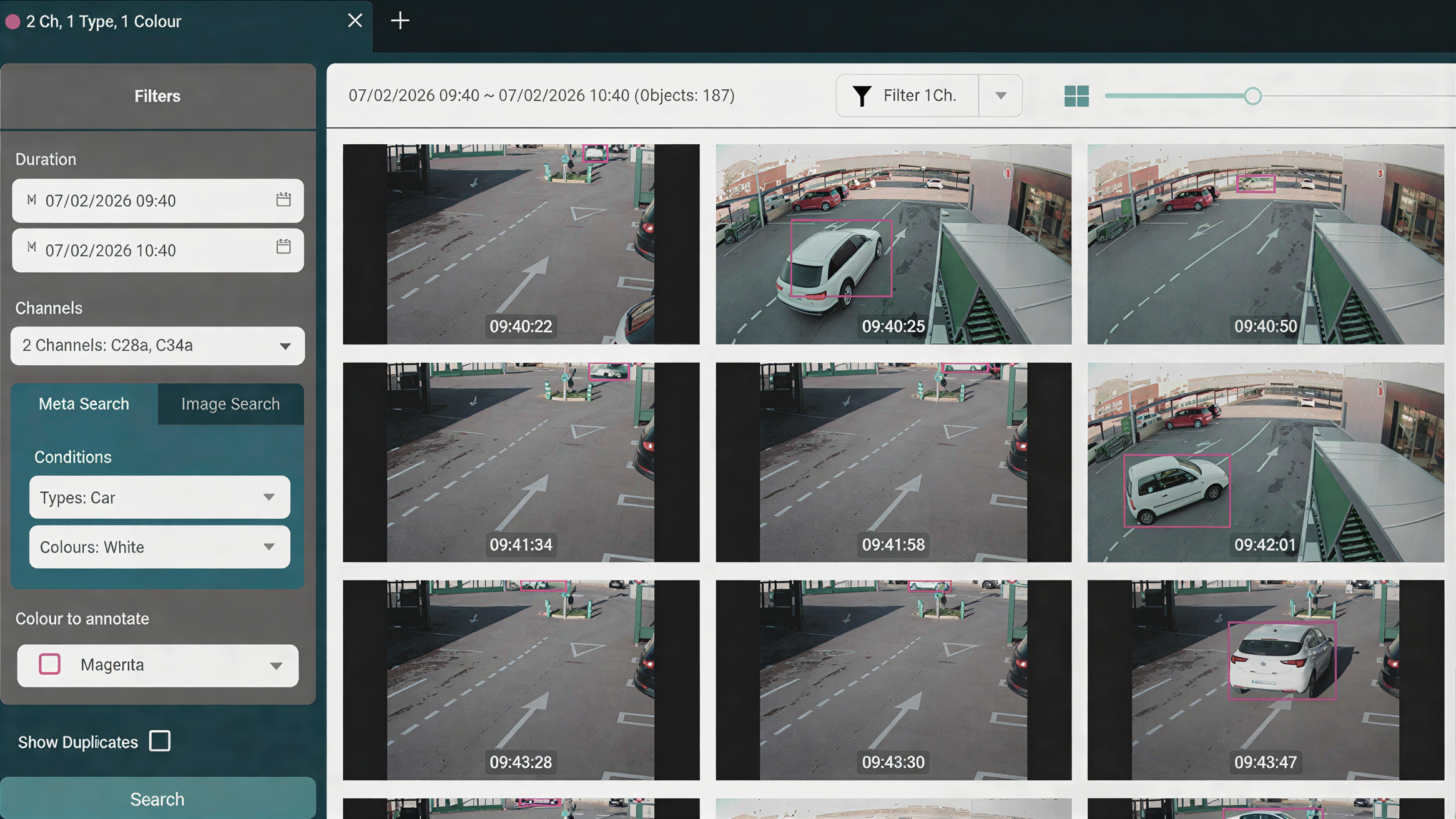
Investigation time drops from hours to seconds (search "white van" instead of scrubbing footage)
False alarms drop 90% (the system knows a person from a shadow)
Safety violations get flagged before they become incidents
Operational bottlenecks become visible in your dashboard, not your quarterly reports
The infrastructure you already paid for can do more. Here's how.
From Cost Centre to Value Driver: The ROI of AI Video Analytics
From Forensic to Proactive: Why Time Matters
The Cost of Manual Review
Here's a scenario that plays out in warehouses, retail stores, and manufacturing facilities daily:
Something happens at 11:47 AM. A forklift damages inventory. A customer claims they slipped. A delivery arrives but you can't confirm what was actually unloaded. You discover the issue at 4 PM.
Now what?
Someone needs to find those specific minutes of footage. They pull a manager off the floor—someone billing at $50-$100/hour. That manager opens the VMS interface and starts the process:
8 cameras cover the area
4-hour window to review
That's 32 camera-hours of footage to scrub through
If they're efficient: 3-4 hours to find a 5-minute incident
Cost per investigation: $150-$400
Multiply by 10-20 incidents monthly: $1,500-$8,000/month
Annual cost: $18,000-$96,000 just to find out what happened
This doesn't include the opportunity cost—what else could that manager be doing instead of watching recorded footage at 8x speed?
AI-powered analytics changes the search paradigm completely.
Instead of scrubbing footage, you search by what you're looking for:
Query: "white van, loading dock, Tuesday between 10 AM and 2 PM"
Result: 3 matches in 8 seconds
Click through to review: 2 minutes total
Cost: Negligible
Search by car type and colours with Wavestore Forensic Search
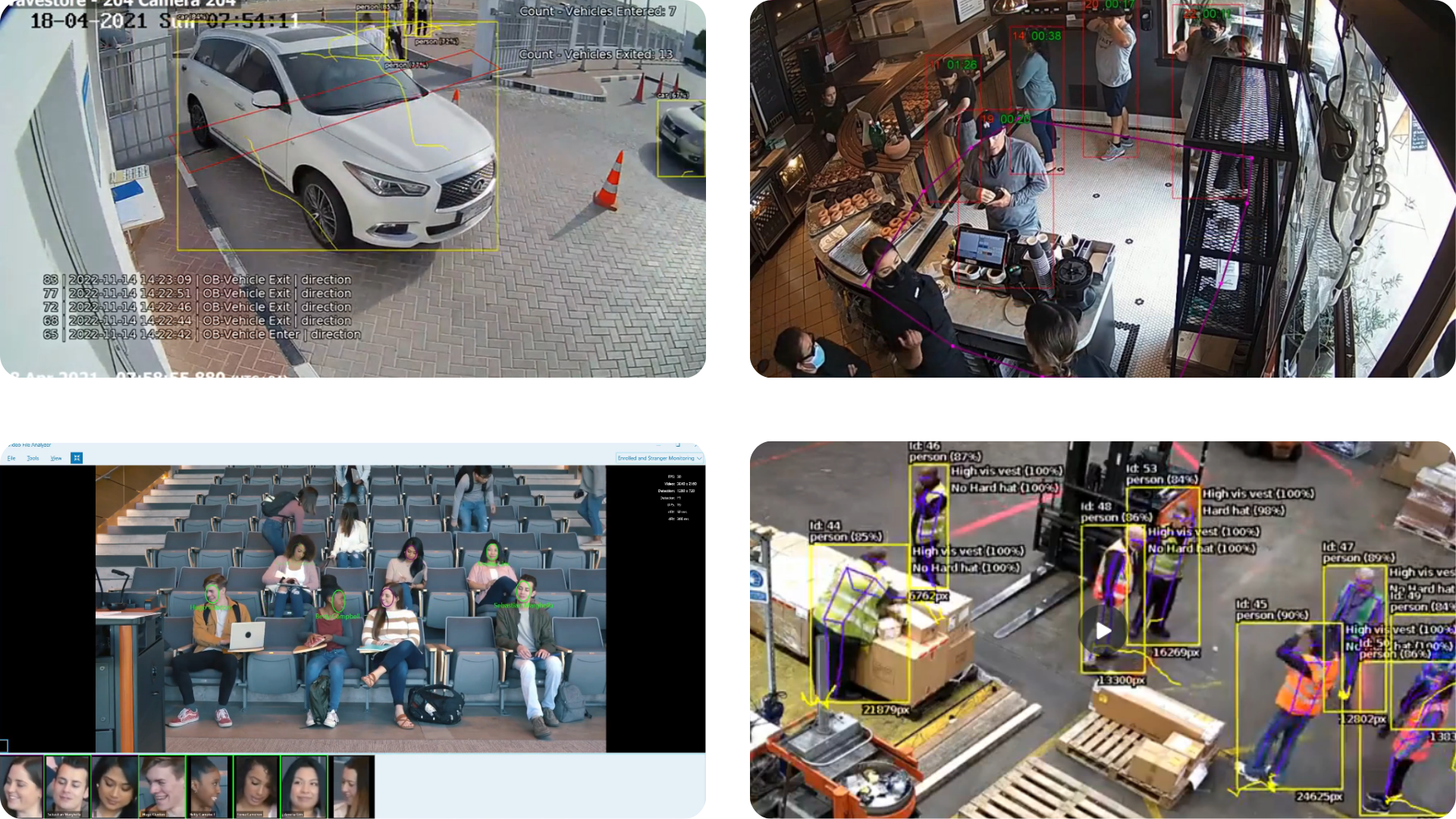
The technology works through object classification (vehicles, people, equipment), attribute recognition (color, size, type), spatial filtering (which camera zones), and temporal queries (time ranges). The system has already analyzed and tagged the footage. You're searching metadata, not watching video.
Time savings: 99% reduction in investigation time
This matters for more than cost. When an incident needs immediate attention—a safety violation, a quality issue, a security breach—responding in minutes instead of hours can be the difference between a near-miss and a major problem.
Proactive Alerts: Knowing Before It Becomes a Problem
Smart search solves the forensic problem—finding what happened. But the bigger operational value comes from alerts that flag issues as they occur, or better yet, before they escalate.
AI analytics can monitor for specific conditions continuously across all cameras:
Safety monitoring:
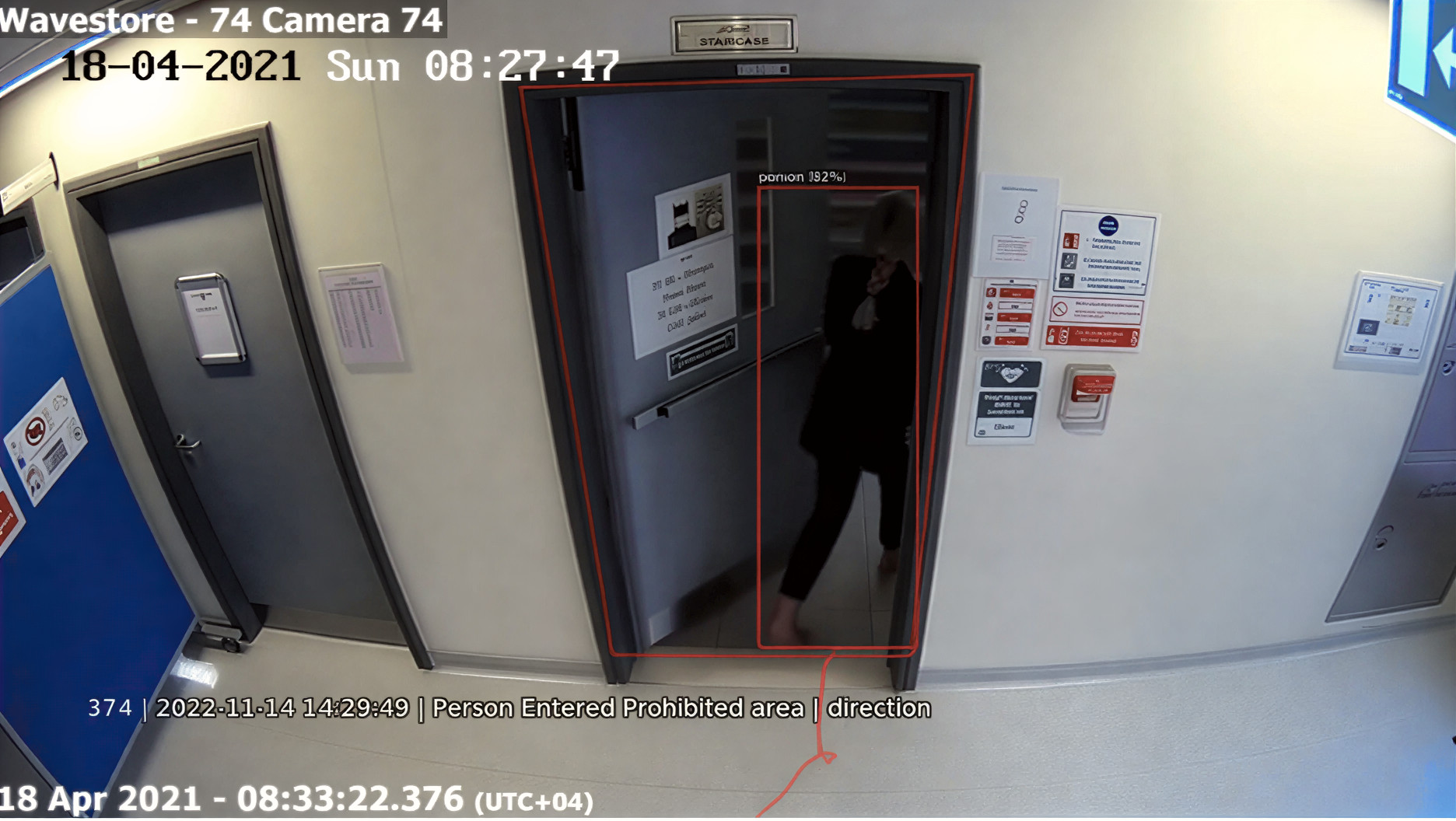
"Forklift detected in pedestrian zone" → Alert to floor supervisor
"Worker without required PPE in restricted area" → Alert to safety officer
Operational efficiency:
"Delivery vehicle at loading bay >30 minutes" → Alert to logistics coordinator
"Queue length exceeds 8 people" → Alert to shift manager
Security and compliance:
"Vehicle on site outside authorized hours" → Alert to security
"Access door held open >5 minutes" → Alert to facilities
The system watches continuously. You respond when it matters.
Operational impact:
Manufacturing facilities have reported up to 50% reduction in unplanned downtime through early detection of equipment issues and workflow problems. Some achieve ROI in under a year from uptime improvements and reduced manual monitoring costs alone.
The difference between reactive and proactive isn't just speed—it's whether you're fixing problems or preventing them.
Person Entered Prohibited Area - Wvaestore Analytics
Applications Beyond Security Operations
Video analytics capability extends into areas that often aren't considered "security" at all:
Incident and liability documentation: When an employee claims a slip-and-fall occurred at 2:15 PM, smart search can verify or disprove the claim in under a minute. Same for customer incidents, property damage claims, or contractor liability questions. The time savings matter, but more importantly, you're working with facts instead of conflicting accounts.
Average cost to fully investigate and resolve a fraudulent workers' compensation claim: $15,000-$50,000. Having immediate access to relevant footage changes those economics significantly.
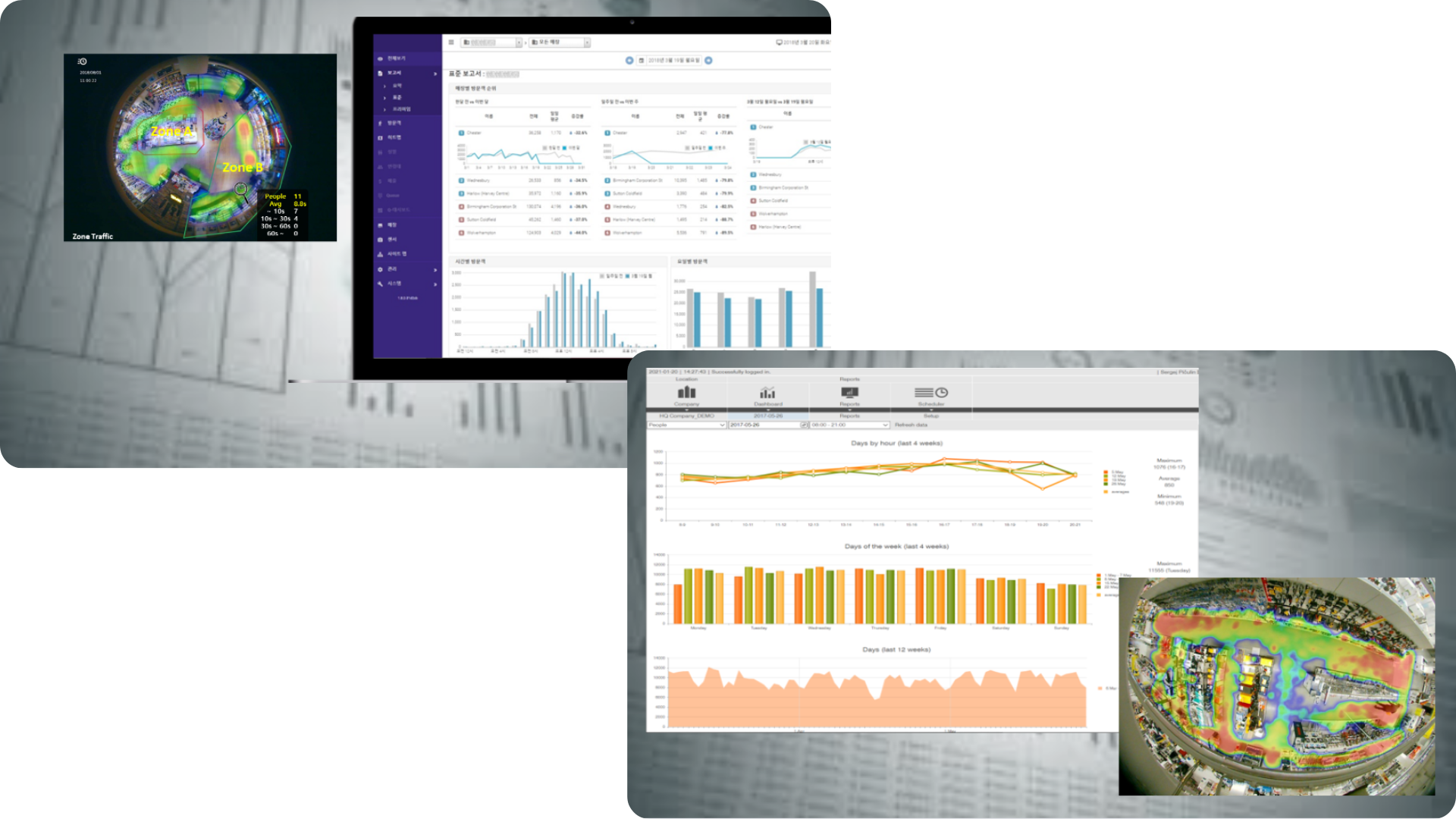
Operational pattern analysis: Beyond individual incidents, aggregate data reveals patterns that manual observation misses. Which loading dock consistently runs slower? Which retail entrance sees the most foot traffic by hour? Where do workflows bottleneck predictably?
This isn't about monitoring individual employee performance—it's about identifying systemic issues in layout, process, or scheduling that cost time and money.
The same infrastructure serving security and safety functions provides operational intelligence as a byproduct. The question is whether you're capturing that value or ignoring it.
Operational Applications by Sector
AI video analytics delivers measurable value when applied to real operational problems. Here's what that looks like by industry:.
Retail: Loss Prevention and Operations
Self-checkout shrinkage:
U.S. retail shrink exceeded $112 billion in 2022, with self-checkout areas particularly vulnerable. AI analytics addresses this through video-POS integration—the system correlates what the register records with what the camera sees.
Detection capabilities:
Items scanned but not bagged
Wrong items scanned (high-value item rung up at low-value price)
Items skipped entirely
Scanning pattern anomalies
According to industry research, retailers deploying AI at self-checkout have seen up to 30% shrink reduction in high-risk stores within the first year. Video-POS matching also accelerates fraud investigations by approximately 50%, reducing the labor cost of loss-prevention teams.
Customer flow and queue management:
Heat mapping shows where customers actually walk versus where you think they walk. Dwell-time analysis identifies which areas hold attention and which get passed by. Queue detection triggers alerts when checkout lines exceed thresholds, giving managers time to open additional registers before customers abandon purchases.
These aren't abstract metrics—they translate directly into:
Better product placement (high-margin items in high-traffic zones)
Optimized staffing (more people when traffic is high, fewer when it's not)
Reduced queue abandonment (alerts enable response before customers leave)
When fully deployed, operational analytics in retail environments can contribute 5-10% savings relative to store revenue through a combination of shrink reduction and efficiency improvements.
Manufacturing: Safety, Quality, and Uptime
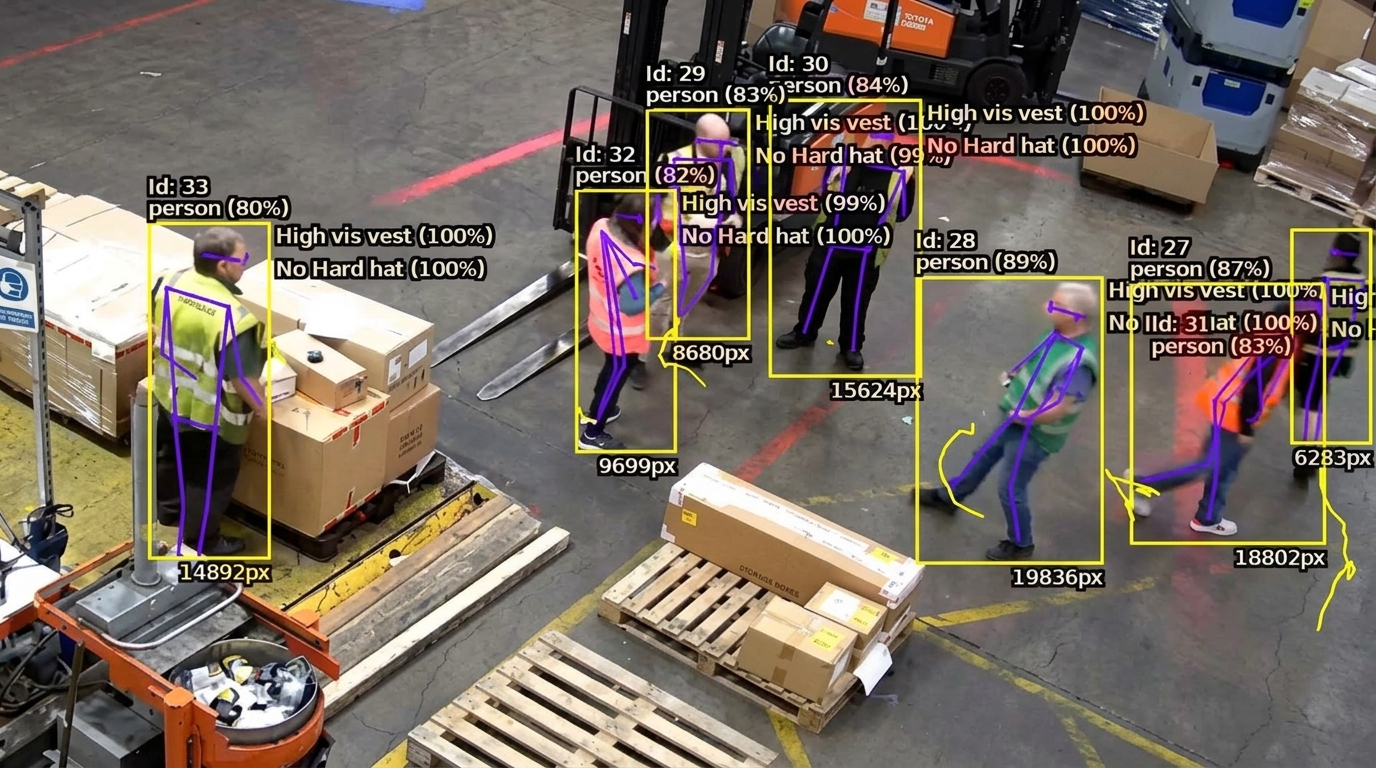
PPE compliance and safety:
A single major workplace injury costs approximately $1.5 million when you include indirect costs—immediately justifying an AI video analytics system. Beyond the human cost, OSHA violations range from $7,000-$70,000 per incident, and workers' comp claims from preventable accidents average over $40,000.
AI-based PPE detection works continuously:
Real-time detection of missing hardhats, safety vests, eye protection
Instant alerts to supervisors before an incident occurs
Automated compliance logging for audit trails
Pattern recognition identifying repeat violations for targeted training
Manufacturing facilities report measurable reduction in safety incidents. The ROI comes from incidents that don't happen.
Quality control and defect detection:
Manual inspection creates production bottlenecks and allows defects to escape downstream—where they're exponentially more expensive to fix. AI visual inspection runs at full production speed without slowing the line.
Detection capabilities include surface defects, dimensional variations, assembly errors, and missing components. The system doesn't get tired, distracted, or inconsistent.
Research analyzing 115 factories showed 87% saw positive ROI within one year from quality improvements and labor savings. Raising Overall Equipment Effectiveness (OEE) even a few percentage points through better quality control translates directly into revenue without additional capital expenditure.
Downtime prevention:
Manufacturing downtime costs exceed $50 billion annually in the U.S. Often the root causes of recurring slowdowns remain invisible because they're not systematically tracked.
AI analytics can:
Track equipment status and usage patterns automatically
Identify bottlenecks by time, day, and zone
Correlate slowdowns with shift changes, maintenance schedules, or specific operators
Flag equipment behavior changes that precede failures
One vendor report cites up to 50% reduction in unplanned downtime from proactive alerts. Early detection, idle time visibility, and workflow optimization deliver measurable productivity gains.
Logistics: Yard and Warehouse Operations
Dock and yard management:
In logistics facilities, visibility matters. How long are trucks waiting at loading docks? Where are forklifts creating congestion? Is cargo loading matching plans? Without systematic monitoring, these questions get answered through complaints and missed SLAs.
Logistics firms have achieved ROI in 6-12 months through efficiency gains and shrink reduction. Quick search capabilities—finding specific incidents in seconds instead of hours—save hundreds of staff-hours per incident.
Theft and pilferage prevention:
Cargo theft and internal shrinkage represent multibillion-dollar problems in logistics. AI security measures include:
Automatic license plate recognition at entry/exit points
Anomaly alerts for unusual hours access
Perimeter breach detection
Behavioral pattern recognition
The combination of faster incident response, visible deterrence, and reduced actual losses creates measurable ROI.
The False Alarm Problem (And How AI Solves It)
The Hidden Cost of Conventional Motion Detection
Basic motion detection is binary: movement detected, send alert. It doesn't differentiate between:
Shadows from passing clouds
Tree branches moving in wind
Small animals
Headlight reflections
Rain/snow on the lens
Actual security threats
The math:
False alarm rate with basic motion detection: 95%+
Monitoring center cost per alert: $5-$15
Monthly false alarms: 200-500
Monthly cost in wasted responses: $1,000-$7,500
Annual waste: $12,000-$90,000
Beyond direct cost, there's the human factor: alert fatigue. When 95% of alerts are false, security staff start ignoring them. That's when real threats get missed.
Behavior: Walking vs. running vs. loitering vs. climbing
Authorization: Known vehicle vs. unknown vehicle
Context: Normal activity vs. unusual behavior for time/location
Environment: Daytime shadow vs. nighttime intrusion
This classification happens through training on millions of images. The system learns patterns: what a person looks like from different angles, how a vehicle moves versus a plastic bag in the wind, what "normal" looks like for each zone at each time of day.
Result:
Alert volume drops 90%
False positive rate drops to <10%
Security staff respond to actual threats
Real incidents get caught, not buried in noise
Before AI:
500 monthly alerts
475 false alarms (95%)
25 real security events
Cost: $2,500-$7,500/month
After AI:
50 monthly alerts
5 false alarms (10%)
25 real security events (all captured)
Plus additional proactive alerts (safety, operations)
The operational benefit extends beyond cost savings: security staff can focus on real threats, response times improve, and the system becomes trusted rather than ignored.
The Infrastructure Question: Do You Need New Cameras?
The Assumption (Usually Wrong)
Most organizations assume AI video analytics requires:
Replacing all cameras ($100K-$500K)
Complete infrastructure overhaul
Months of downtime
Massive upfront capital
That assumption stops projects before they start.
The Reality: Retrofit, Don't Replace
Modern AI analytics platforms—including open architecture VMS solutions—work with existing camera infrastructure. The key is camera-agnostic design.
Compatibility reality:
Modern IP cameras (2015-present):
Resolution: 1080p to 4K
Compatibility: Excellent
Hardware changes needed: None
AI capabilities: Full
Older IP cameras (2010-2015):
Resolution: 720p-1080p
Compatibility: Good
Hardware changes: Possibly firmware updates
AI capabilities: 80-90% (some features may require higher resolution)
Legacy analog cameras:
Compatibility: Requires IP encoder (~$100/camera)
AI capabilities: Limited by resolution
Strategy: Replace only critical coverage areas (typically 20-30% of system)
Most organizations find 70-90% of their existing cameras work without modification. The focus shifts from hardware replacement to software deployment.
Deployment Architecture: Edge, Cloud, or Hybrid
Edge processing (on-premises):
Video analyzed locally on-camera or on-premise appliances
Advantages: Low latency, reduced bandwidth, data stays on-site
Best for: Real-time response requirements, privacy-sensitive environments, bandwidth constraints
Deep analytics and cross-site intelligence in cloud
Advantages: Combines low latency with powerful analytics
Best for: Most enterprise deployments
In practice, hybrid architectures deliver optimal ROI by leveraging the strengths of both approaches. Edge handles time-critical functions (safety alerts, intrusion detection), while cloud provides sophisticated analytics (pattern recognition across sites, trend analysis, model training).
Deploying AI analytics on existing camera networks requires an open-platform Video Management Software (VMS) that acts as the central event bus, linking edge alerts with storage databases.
What You Actually Need
Processing infrastructure:
Edge: On-site server or appliance (if not using on-camera analytics)
Cloud: Subscription service (no hardware)
Hybrid: Combination based on requirements
Software licensing:
Typically per-camera pricing
Scalable (add cameras incrementally)
Various deployment models available
Integration timeline:
Cloud deployment: 1-3 days for initial setup
Edge deployment: 1-2 weeks including hardware installation
Not months of disruption
The question shifts from "can we afford to upgrade our entire camera infrastructure" to "what ROI can we get from our existing infrastructure with software deployment?"
Implementation: Pilot to Production
Phase 1: Pilot (Weeks 1-12)
Objective: Prove ROI in a controlled environment before full deployment.
Establish baseline metrics before analytics activation
Time investment required:
Your team: 10-15 hours total over the pilot
Vendor handles: ~80% of setup and configuration
Success criteria (measured at 90 days):
Target improvement vs. baseline (e.g., 15-20% shrink reduction, 5-10% labor time saved)
Alert accuracy (false positive rate <15%)
System reliability (uptime >99%)
User adoption (>50% of relevant staff actively using the system)
Decision point: If pilot meets success criteria, proceed to scaled deployment. If not, troubleshoot or re-evaluate approach.
Ready to See Your ROI Potential?
Book a 15-minute demo with a Wavestore specialist. We'll show you how AI analytics works with your existing cameras — no obligation, no hardware required.
Objective: Expand to all viable cameras and integrate with existing systems.
What happens:
Roll out to all compatible cameras
Integration with POS, access control, ERP systems
Staff training on dashboards and alert response
Customization of rules for specific operational needs
Time investment:
Your team: 40-60 hours over the phase
Focus: Testing, feedback, integration validation
Expected results:
Full system operational
Measurable KPI impact (tracked monthly)
Workflow integration
ROI tracking against projections
Phase 3: Optimization (Months 6-24)
Objective: Fine-tune performance and expand use cases.
What happens:
Alert threshold adjustment based on real-world feedback
Additional use case deployment (heat mapping, occupancy, compliance)
Cross-site analytics and reporting
Continuous improvement based on data
Expected results:
Full ROI realization (many organizations see 3-5x ROI by year 3)
Additional use cases identified and deployed
Data-driven decision-making integrated into operations
What Your Organization Needs to Provide
IT (10-20 hours):
Network access for analytics infrastructure
Camera stream access coordination
Basic troubleshooting (vendor handles most issues)
Operations/Security (20-30 hours):
Alert rule definition
Dashboard training
Threshold adjustment based on operational feedback
Management (5-10 hours):
Monthly ROI review
Expansion approval
Internal communication of results
Reality: Vendors handle approximately 80% of deployment work. Your role focuses on configuration, feedback, and operationalizing the insights.
Vendor Selection: What Actually Matters
Open Platform vs. Proprietary
The most important technical decision isn't which features a platform offers—it's whether that platform locks you in or gives you flexibility.
The video analytics market is fragmented. Major VMS vendors (Milestone, Genetec, Avigilon) embed AI capabilities. Pure-play AI companies offer specialized analytics. Hyperscalers provide cloud AI services. System integrators tie it together.
Open platform characteristics:
Works with multiple camera manufacturers
Integrates with standard VMS platforms
Standard APIs for third-party integration
Flexibility to add or change vendors
Proprietary system characteristics:
Requires specific brand cameras
Limited or no third-party integration
Vendor dependency for all expansion
High switching costs
Questions to verify openness:
"Which camera manufacturers does this support out-of-box?"
"Can we integrate with our existing [VMS platform]?"
"What APIs are available for custom integration?"
"What happens if we want to use a different camera brand in the future?"
If the vendor hesitates or gives vague answers, that's a red flag.
Total Cost of Ownership
Initial pricing rarely tells the full story.
Get full TCO breakdown:
Initial setup: Integration, configuration, training
Hardware: Any required servers, appliances, or camera upgrades
Licensing: Per-camera, per-server, or subscription models
Ongoing: Support, maintenance, cloud fees
Future: Price escalation terms
Questions to ask:
"What's the all-in cost for year one, including all setup and integration?"
"What are ongoing costs in years 2-5? Are there automatic price increases?"
"What's included in standard support vs. premium support?"
"How does pricing scale when we add cameras?"
"Are there any usage-based fees we should know about?"
Get it in writing. A 3-5 year TCO projection prevents surprises.
Because high-resolution video streams and continuous metadata logging tax your physical infrastructure, sizing your storage correctly is the first step in protecting your ROI. You can use the Wavestore Storage & Server Calculator to instantly estimate server and storage requirements based on your camera counts, resolution, and retention policy.
Proof of Concept Requirements
Never deploy without testing in your actual environment.
Pilot essentials:
Your cameras (not vendor demo equipment)
Your use cases (not generic scenarios)
Your team using it daily
30-90 day duration (long enough to measure impact)
Measurable KPI improvement (15%+ in target metric)
System reliability (uptime, integration stability)
If a vendor resists a reasonable pilot program, that tells you something about their confidence in real-world performance.
Addressing Internal Objections
CFO: "We Don't Have Budget for This"
The conversation:
Current costs of the problems AI analytics addresses:
Manual video review: $1,500-$8,000/month
False alarm monitoring: $1,000-$7,500/month
Shrinkage/losses: Variable by industry, often $10,000-$50,000+/month
Safety incidents: $5,000-$15,000/month average
Total addressable costs: Often $200,000-$500,000+ annually
AI analytics investment:
Pilot: $10,000-$30,000
Full deployment (year 1): $50,000-$150,000 depending on scale
Ongoing: $12,000-$50,000/year
Conservative ROI projection:
Capture 30% of addressable costs: $60,000-$150,000 annual value
Payback: 12-24 months
3-year ROI: 300-500%
Research shows 85%+ of organizations achieve ROI within 12 months. In manufacturing and banking, 90-95% see payback in under a year.
This isn't speculative—pilot program proves ROI before full commitment.
IT: "We Don't Have Resources for Deployment"
The reality:
Modern analytics deployments are vendor-managed, not IT projects.
IT time requirement:
Week 1: 4 hours (network access, camera inventory)
Weeks 2-4: 6 hours (testing, feedback on integration)
Weeks 5-6: 5 hours (go-live support)
Total: ~15 hours over 6 weeks
Vendor provides:
Installation and configuration (~80% of work)
Integration with existing systems
Training for end users
Ongoing support and troubleshooting
This isn't a 6-month IT project. It's a vendor-managed deployment with IT in a review role.
Additional benefit:Post-deployment, smart search reduces IT requests for footage from security and operations teams—typically saving 10-20 hours monthly.
Legal/Compliance: "Privacy and Regulatory Risk"
The concerns are valid. The solutions exist.
Video footage often contains personal data, triggering privacy regulations:
EU: GDPR requirements for lawful basis, purpose limitation, data security
U.S.: State-level regulations (CCPA, BIPA) with varying requirements
Healthcare: HIPAA considerations if footage can capture PHI
Workplace: Employee notification requirements vary by jurisdiction
Compliance approach:
Technical measures:
Privacy-by-design: On-device processing where possible
Anonymization: Analytics on blurred or masked imagery when appropriate
Data minimization: Retain only what's necessary, auto-delete after defined period
Access controls: Role-based permissions, full audit logging
Encryption: Data in transit and at rest
Process measures:
Privacy impact assessment before deployment
Clear policies on what's monitored and why
Legal review of implementation plan
Employee communication and signage
Documented lawful basis for processing
Deployment options:
Edge processing keeps sensitive data on-premises
Hybrid architecture processes sensitive data locally, less-sensitive in cloud
Configurable: You control what gets analyzed and how
Many analytics platforms include compliance features as standard (SOC 2 certification, GDPR-aligned data handling, audit trails). The key is engaging legal/compliance from day one, not after deployment.
Operations: "Staff Will See This as Surveillance"
The concern:Employees and managers may perceive AI analytics as micromanagement or invasive monitoring.
The approach:Position as operational tool, not surveillance system.
Communication framework:
Purpose: Safety, efficiency, and security—not individual performance monitoring
Transparency: Clear explanation of what's monitored and why
Research confirms successful adoption requires change management, not just technology. Organizations that involve end users, communicate transparently, and demonstrate tangible benefits see significantly higher adoption rates.
When implemented thoughtfully, analytics systems are typically embraced because they help people do their jobs more effectively and safely.
The Competitive Context
Market Growth and Adoption
The video analytics market is growing at 20-30% CAGR through 2030, with Gartner projecting $2.5 trillion in global AI spending by 2026. This isn't hype—it's market reality driven by operational pressures:
That gap doesn't close—it widens with each quarter.
The Strategic Question
The question isn't whether AI video analytics delivers ROI—research confirms 85%+ of organizations achieve it within 12 months. The question is timing: deploy now and start building advantage, or wait while competitors pull ahead.
Waiting has cost:
Continued operational inefficiencies
Losses that could be prevented
Competitive disadvantage that compounds
Lost learning time (both technical and organizational)
The infrastructure is already in place. The technology is proven. The ROI is documented.
Conclusion: Making the Decision
You already own the cameras. You already pay for storage and network bandwidth. The question is whether that infrastructure should do more than record.
What Changes with AI Analytics
Forensic to proactive:
Search "white van Tuesday morning" instead of scrubbing hours of footage
Get alerted when queue length exceeds threshold, before customers leave
Know about safety violations before they become incidents
Cost center to value generator:
Investigation time: Hours → seconds
False alarms: 95% → <10%
Manual monitoring: Reduced or eliminated
Operational visibility: Blind spots → dashboard
Reactive to preventive:
Find out what happened → prevent it from happening
Respond to complaints → fix systemic issues
Guess at problems → see data
The Investment Reality
Proven ROI:
85%+ of organizations achieve ROI within 12 months
Manufacturing/banking: 90-95% payback in under a year
Typical payback: 18-24 months
3-5 year ROI: 3-5x investment
Manageable risk:
Pilot proves value before full commitment (3-6 months)
Most existing IP cameras work without replacement
Vendor-managed deployment (15 hours of your team's time)
Clear go/no-go decision points based on measured results
Scalable approach:
Start with 5-10 cameras and one use case
Expand when pilot proves ROI
Add use cases incrementally
Full deployment over 12-24 months
The Strategic Decision
This isn't about whether AI video analytics works—the research confirms it does. The decision is whether to deploy now or wait while:
Operational inefficiencies continue
Competitors build advantage
The learning curve gets steeper
The gap widens
The cameras are installed. The infrastructure exists. The question is whether it should provide more value than it currently does.
That's not a technology question. It's a business decision.
Next Steps
If You're Ready to Explore
1. Assess current infrastructure (15 minutes):
Camera inventory (types, ages, coverage areas)
Current VMS platform (if any)
Primary operational pain points
Rough idea of addressable costs
2. Define success criteria (30 minutes):
Top 2-3 use cases (loss prevention, safety, efficiency)
Current baseline metrics
Minimum acceptable improvement
Budget parameters
3. Vendor discussions:
Request demonstrations with your cameras and use cases
Get full TCO breakdown (3-5 years)
Ask about pilot programs
Check references in your industry
4. Pilot program (3-6 months):
Deploy on 5-10 cameras
Measure against baseline
Track KPIs monthly
Make data-driven go/no-go decision
If You're Still Researching
Evaluate the business case:
Calculate current costs (video review, false alarms, shrinkage, incidents)
Identify highest-value use cases
Determine budget availability
Identify internal stakeholders
Research deployment models:
Cloud vs. edge vs. hybrid
Compliance requirements for your industry
Open platform vs. proprietary considerations
Vendor capabilities in your sector
Build internal consensus:
Share ROI data with finance
Address IT resource concerns
Engage legal on compliance
Involve operations on use cases
The technology is mature. The ROI is proven. The implementation is straightforward.
The question is whether your cameras will continue just recording, or start delivering operational value.
View Wavestore v6.50 presentation
Solutions for a world we can't yet see. Discover v6.50 features helping people and businesses.